#701 ARFI FOUNDATION कन्यादान योजना

Related Posts
#2887 ** "Empowering Change: How Arfi Foundation Leverages YouTube for Social Impact"
**
As a non-governmental organization (NGO) focused on promoting education, healthcare, and economic empowerment, Arfi Foundation understands the power of digital media in driving social change. One of the most popular and influential platforms in the digital landscape is YouTube, with over 2 billion monthly active users. In this blog post, we'll explore how Arfi Foundation is harnessing the potential of YouTube to amplify our message, engage with our audience, and drive meaningful impact.
**The Power of YouTube for Social Impact**
YouTube is more than just a video-sharing platform; it's a powerful tool for storytelling, education, and community engagement. For NGOs like Arfi Foundation, YouTube offers a unique opportunity to share our mission, values, and impact with a global audience. By creating engaging, informative, and inspiring content, we can raise awareness about critical issues, promote our programs and services, and build a community of supporters who share our vision.
**Arfi Foundation's YouTube Journey**
At Arfi Foundation, we've been leveraging YouTube for several years, and our experience has been nothing short of transformative. We've created a range of content, from documentary-style videos showcasing our projects and programs to informative tutorials and guides on topics like health and education. Our YouTube channel has become an essential part of our digital strategy, allowing us to reach a wider audience, build brand awareness, and engage with our stakeholders in a more meaningful way.
One of our most popular videos is a documentary-style film that showcases our education program in a rural community. The video highlights the challenges faced by children in accessing quality education, as well as the impact of our program in improving literacy rates and empowering young minds. This video has been viewed thousands of times, and it's helped us raise awareness about the importance of education in breaking the cycle of poverty.
**Strategies for Success on YouTube**
So, what sets our YouTube content apart? Here are some key strategies that have contributed to our success:
1. **Storytelling**: We believe that stories have the power to inspire, educate, and motivate. Our content is designed to share personal stories, highlight successes, and showcase the impact of our programs.
2. **Authenticity**: We strive to create content that's authentic, honest, and transparent. Our videos are shot in a documentary style, and our presenters are passionate advocates for our mission.
3. **Accessibility**: We understand that not everyone has access to the internet or smartphones. Our content is designed to be accessible, informative, and engaging, even for those who may not have the means to access our programs.
4. **Consistency**: We regularly upload new content, ensuring that our audience stays engaged and informed about our work.
**Practical Tips for NGOs**
If you're an NGO looking to leverage YouTube for social impact, here are some practical tips to get you started:
1. **Define your goals**: Clearly define what you want to achieve through your YouTube content.
2. **Develop a content strategy**: Plan your content in advance, and ensure it aligns with your goals and mission.
3. **Invest in quality equipment**: Invest in good cameras, microphones, and editing software to produce high-quality content.
4. **Engage with your audience**: Respond to comments, engage with your viewers, and build a community around your content.
5. **Monitor your analytics**: Keep track of your viewership, engagement, and other metrics to refine your strategy and optimize your content.
**Conclusion**
As a non-governmental organization, Arfi Foundation recognizes the importance of digital media in driving social change. Our YouTube channel has become an essential part of our digital strategy, allowing us to share our mission, values, and impact with a global audience. By leveraging the power of YouTube, we're able to engage with our stakeholders, raise awareness about critical issues, and build a community of supporters who share our vision.
Whether you're an NGO, a small business, or an individual, YouTube offers a unique opportunity to share your message, build your brand, and drive meaningful impact. By following the strategies outlined in this post, you can harness the power of YouTube to create a lasting difference in the world.
**EXCERPT:**
At Arfi Foundation, we're leveraging the power of YouTube to amplify our message, engage with our audience, and drive meaningful impact. By creating engaging, informative, and inspiring content, we're raising awareness about critical issues, promoting our programs and services, and building a community of supporters who share our vision.




#2538 **Unlocking the Power of YouTube for Social Impact: How Arfi Foundation is Making a Difference**
CONTENT:
As a non-governmental organization (NGO) dedicated to creating positive social change, Arfi Foundation recognizes the vast potential of digital platforms to reach and engage with a global audience. One of the most powerful tools at our disposal is YouTube, the world's largest video-sharing platform. With over 2 billion monthly active users, YouTube offers an unparalleled opportunity for organizations like Arfi Foundation to share their stories, raise awareness about critical issues, and mobilize support for their causes.
At Arfi Foundation, we've been leveraging YouTube to amplify our impact and connect with a wider audience. In this blog post, we'll explore the ways in which we're using YouTube to drive social change, share practical insights and tips, and highlight the success stories that demonstrate the power of this platform.
**Why YouTube Matters for Social Impact**
YouTube's massive user base and diverse content offerings make it an ideal platform for NGOs like Arfi Foundation to reach their target audiences. By creating engaging, informative, and inspiring content, we can:
1. **Raise awareness**: Share stories, experiences, and statistics to educate people about pressing social issues, such as poverty, inequality, and human rights.
2. **Build empathy**: Create emotional connections with our audience by sharing personal testimonials, case studies, and behind-the-scenes glimpses into our work.
3. **Mobilize action**: Encourage viewers to take action, whether it's donating to our cause, volunteering their time, or spreading the word about our organization.
4. **Amplify our voice**: Use YouTube's massive reach to amplify our message and reach a wider audience, including policymakers, influencers, and thought leaders.
**How Arfi Foundation Uses YouTube**
At Arfi Foundation, we've developed a comprehensive YouTube strategy that includes:
1. **Storytelling**: We create engaging, narrative-driven videos that share our stories, successes, and challenges.
2. **Educational content**: We produce informative videos that provide insights into our work, share knowledge, and offer expertise.
3. **Behind-the-scenes**: We give our audience a glimpse into our daily operations, highlighting the dedication and passion of our staff and volunteers.
4. **Social media integration**: We share our YouTube content on our social media channels to maximize our reach and engagement.
**Success Stories**
Our YouTube efforts have yielded impressive results, including:
* A 25% increase in website traffic, driven by YouTube viewers who are interested in learning more about our organization.
* A 50% increase in social media engagement, as our audience shares and discusses our content on platforms like Facebook, Twitter, and Instagram.
* A 30% increase in donations, as viewers feel inspired to support our cause after watching our videos.
**Practical Tips for NGOs**
If you're an NGO looking to leverage YouTube for social impact, here are some practical tips to get you started:
1. **Define your purpose**: Clearly articulate your goals and objectives for using YouTube.
2. **Develop a content strategy**: Plan your content types, formats, and frequency to engage your audience.
3. **Invest in quality equipment**: Use high-quality cameras, microphones, and editing software to produce professional-looking videos.
4. **Optimize your videos**: Use keywords, tags, and descriptions to help your videos reach a wider audience.
5. **Engage with your audience**: Respond to comments, ask for feedback, and encourage discussion to build a loyal community.
**Conclusion**
YouTube offers a vast opportunity for NGOs like Arfi Foundation to amplify their impact, reach new audiences, and drive social change. By creating engaging, informative, and inspiring content, we can build empathy, mobilize action, and amplify our voice. As we continue to innovate and adapt our YouTube strategy, we're excited to see the positive impact we can make together.
EXCERPT:
"At Arfi Foundation, we're harnessing the power of YouTube to drive social change and connect with a global audience. In this blog post, we'll explore how we're using YouTube to amplify our impact, share practical insights and tips, and highlight the success stories that demonstrate the power of this platform."




#2189 **Unlocking the Power of YouTube for Social Impact: How Arfi Foundation Empowers Change**
**CONTENT**
As a leading NGO/charity organization, Arfi Foundation is committed to using innovative technologies to amplify our social impact. One of the most powerful tools in our digital toolkit is YouTube, the world's largest video-sharing platform. With over 2 billion monthly active users, YouTube offers an unparalleled opportunity to reach, engage, and inspire our audience. In this blog post, we'll explore how Arfi Foundation leverages YouTube to drive social change and provide practical insights for other NGOs/charities looking to do the same.
**Why YouTube Matters for NGOs/Charities**
YouTube is more than just a video-sharing platform – it's a powerful storytelling medium that can help NGOs/charities like Arfi Foundation connect with their audience on a deeper level. By sharing compelling stories, informative content, and inspiring messages, we can raise awareness about our cause, mobilize support, and drive meaningful action. According to a study by Nonprofit Leadership Alliance, 70% of donors are more likely to give to a charity that shares their values and mission, and YouTube is an excellent platform to showcase our values and mission.
**How Arfi Foundation Uses YouTube**
At Arfi Foundation, we've been using YouTube to great effect for several years now. Here are some ways we've leveraged the platform to drive social impact:
1. **Storytelling**: We create engaging, emotive videos that share the stories of the people and communities we serve. These videos humanize our cause, highlighting the impact of our work and inspiring viewers to take action.
2. **Education and Awareness**: We produce informative videos that explain our mission, programs, and initiatives. These videos help educate our audience about the issues we're tackling and provide valuable insights into our work.
3. **Fundraising**: We use YouTube to share our fundraising campaigns, providing a platform for supporters to donate and make a difference.
4. **Community Engagement**: We engage with our audience through comments, social media, and live streams, fostering a sense of community and encouraging feedback and participation.
**Practical Tips for NGOs/Charities**
If you're an NGO/charity looking to harness the power of YouTube, here are some practical tips to get you started:
1. **Define your strategy**: Determine what you want to achieve on YouTube and develop a clear content strategy to get there.
2. **Create high-quality content**: Invest in good camera equipment, editing software, and storytelling techniques to produce engaging, professional videos.
3. **Optimize your videos**: Use relevant keywords, tags, and descriptions to ensure your videos are discoverable by your target audience.
4. **Engage with your audience**: Respond to comments, answer questions, and foster a sense of community to build a loyal following.
5. **Monitor and analyze**: Use YouTube Analytics to track your performance, identify areas for improvement, and adjust your strategy accordingly.
**Conclusion**
YouTube is a powerful tool for NGOs/charities like Arfi Foundation to drive social impact. By leveraging the platform's vast audience and storytelling capabilities, we can raise awareness, mobilize support, and inspire meaningful action. Whether you're just starting out or looking to take your YouTube presence to the next level, we hope these insights and practical tips will help you unlock the full potential of YouTube for social good.
**EXCERPT**
At Arfi Foundation, we're harnessing the power of YouTube to drive social change and inspire meaningful action. Learn how we're using the platform to raise awareness, mobilize support, and foster community engagement, and discover practical tips to help other NGOs/charities do the same.




#1840 ** "Unlocking the Power of YouTube: How Arfi Foundation Uses Video Content to Drive Social Impact"
**
As a non-governmental organization (NGO) dedicated to promoting education, healthcare, and economic empowerment in underserved communities, Arfi Foundation recognizes the immense potential of digital platforms in achieving our mission. One platform that has proven to be a game-changer is YouTube, the world's largest video-sharing platform. With over 2 billion monthly active users, YouTube offers a vast audience for Arfi Foundation to share our stories, create awareness about social issues, and inspire action.
**The Power of Video Content**
Video content is a powerful tool for social impact. It allows us to convey complex information in an engaging and accessible way, making it easier for our audience to understand and relate to our message. At Arfi Foundation, we use YouTube to create a range of video content, including:
* **Awareness-raising videos**: These videos aim to educate our audience about the issues we tackle, such as poverty, inequality, and lack of access to education and healthcare.
* **Success stories**: We share inspiring stories of individuals and communities who have benefited from our programs, highlighting the positive impact of our work.
* **Behind-the-scenes content**: We take our audience on a journey with us, showcasing the planning, implementation, and execution of our projects.
* **Educational content**: We create tutorials, infographics, and animations that provide valuable information and skills to our audience.
**How Arfi Foundation Utilizes YouTube**
At Arfi Foundation, we have a dedicated team that manages our YouTube presence. Here are some ways we utilize the platform:
* **Content creation**: We produce high-quality video content, often in collaboration with local stakeholders, experts, and beneficiaries.
* **Channel optimization**: We optimize our YouTube channel with relevant keywords, descriptions, and tags to ensure our content is discoverable by our target audience.
* **Engagement**: We engage with our audience through comments, likes, and shares, fostering a community around our channel.
* **Collaborations**: We partner with other NGOs, influencers, and content creators to amplify our reach and message.
* **Analytics**: We use YouTube Analytics to track our performance, identify areas for improvement, and adjust our strategy accordingly.
**Measuring Impact**
While YouTube is a powerful platform, measuring its impact can be challenging. At Arfi Foundation, we use a range of metrics to evaluate the success of our YouTube efforts, including:
* **View counts**: We track the number of views our videos receive, indicating the reach of our content.
* **Engagement metrics**: We monitor likes, comments, and shares, which demonstrate audience engagement and interest.
* **Website traffic**: We track the number of visitors to our website, which can be influenced by our YouTube content.
* **Donations**: We measure the increase in donations and support we receive as a result of our YouTube content.
**Conclusion**
YouTube is a valuable tool for Arfi Foundation to achieve our mission and goals. By creating engaging video content, utilizing the platform effectively, and measuring our impact, we can drive social change and inspire action. As we continue to navigate the ever-changing digital landscape, we remain committed to using YouTube and other digital platforms to amplify our message and make a meaningful difference in the lives of individuals and communities worldwide.
**EXCERPT:** "At Arfi Foundation, we harness the power of YouTube to drive social impact by creating engaging video content, utilizing the platform effectively, and measuring our impact. Join us as we explore the world of digital storytelling and learn how we're using YouTube to make a difference."




#1476 Why Zone 3 Cardio Is Just As Good As Zone 2
There are benefits to training in heart rate zone 2, and you’ve probably heard all about them. But what happens when your heart rate spikes into zone 3, whether when you're on a run or doing cardio at the gym? Surprise: You don’t lose the benefits of zone 2 training. Zone 3 is arguably just as good for you, or maybe even better.
Remember, the reason people are excited about zone 2 training is that it helps you build your aerobic base and burn calories without incurring much fatigue. Guess what zone 3 training also does? Yep, it helps you build your aerobic base, burn even more calories, and usually only incur a tiny bit more fatigue than zone 2. So why aren’t we all doing more zone 3 cardio?
Zone 2 is overrated
There are reasons to run (or do any cardio) at lower intensities, and reasons to use higher intensities. Easy cardio is having a moment right now, so everybody is talking about doing more zone 2. Before heart rate monitors were widespread, you had to judge what was “easy” by yourself, or by comparing your speed of running to what you knew you could do in a race. Non-athletes had the “talk test": If you could hold a conversation while jogging, you knew you were at an easy, steady pace.
But when everybody has a watch that tells them their heart rate, suddenly we’re looking at specific numbers, and our watches color code the numbers so you know when you’re in zone 2 versus zone 3. Your heart ticks up a beat? You’re out of your zone. Straight to workout jail!
But the reality is, your body isn’t getting a drastically different workout at 153 beats per minute than it was at 152. There probably isn’t even much difference between, say, 145 and 155, as long as they’re both within that conversational-ish effort level.
Zones aren’t real
The most popular heart rate zone systems use zones that are divided up for convenient measuring. They don't have any precise relationship to what's going on in your body. Your body does have some true dividing lines when it comes to exercise intensity (like the point at which you can't speak comfortably anymore, or the point at which lactate accumulates faster than you can clear it), but these don't correspond exactly to the typical five-zone system.
The five-zone system, as a refresher, is based on where your heart rate falls as a percentage of your maximum heart rate. There will be specific percentages defined as the boundaries of each zone, and the five zones are usually described something like this:
zone 1: rest or minimal effort
zone 2: easy breezy conversational pace
zone 3: ??? (this is sometimes described as a "gray zone" you should avoid—I disagree!)
zone 4: pretty hard
zone 5: maximal effort
It's a cute idea, and many people find this system helpful, but these zones are not based on any scientific findings that prove we get such-and-such benefits at 60-70% of max heart rate, and such-and-such different benefits at 71-80%. If you aren’t convinced, just look at how different gadgets and apps define the zones differently: Your “zone 2” might be 60-70% on Apple Watch, but 65%-75% on a Peloton. At, say, 73%, the Apple Watch would say you're in zone 3 but the Peloton would say you're in zone 2. Who is right? Neither, really.
Research on the benefits of exercise doesn’t use heart rate zones, or at least not of this type. They may measure intensity in a few different ways, including whether you are above or below your ventilatory threshold (basically, whether or not you can talk while exercising) or your lactate threshold (measured through blood chemistry, but basically the highest effort you can sustain for a long time). Sometimes they’ll measure METs, which relate to how much energy you use to do work, or they'll put everything in terms of oxygen consumption (this is where the term VO2max comes from). Occasionally these studies will send participants home with heart rate-based guidelines, but those tend to be drawn from their personal scientific measurements, rather than the cookie-cutter zones you get from an app or from watching a video on youtube.
Conversational pace includes zone 2 and most of zone 3
Let’s take a closer look at that idea of the “talk test” or “conversational pace.” The guideline to keep your easy cardio at a chatty pace does come from a scientific concept: the ventilatory threshold.
Imagine you start out at a walk, and every minute or so you increase your speed a bit. As you work harder, you’ll hit a point where your breath becomes a little ragged, and your sentences choppy. If you were conversing with a friend, you'd be grunting out a few words at a time, rather than casually telling a story. That point is your ventilatory threshold, or VT (sometimes called VT1).
When athletes or coaches talk about easy pace or easy efforts, they usually want you below your VT. The way people talk about zone 2, you’d think that the VT occurs at the top of zone 2. But nope—conversational pace is closer to 80%, which is the top of zone 3. For example, here’s a study on recreational runners that found VT1 to be, on average, at 78% of the runners’ max heart rate. And they tested the runners’ max heart rate, rather than using a formula based on age. (Never trust the default formulas.)
So if you’re trying to train at an easy pace, or if you’re using the 80/20 rule to keep 80% of your runs easy, you can do those easy runs or cardio sessions in zones 2 and 3, not just zone 3.
Zone 3 is still aerobic and still easy
Now that I've explained why the zone 2/zone 3 distinction is arbitrary, you see why it makes more sense to look at zones 2 and 3 (or even zones 1 through 3) as a continuum. At the lower end, you’ll be running or pedaling slower, burning fewer calories, and feeling like you’re barely doing any work. (Hello, cozy cardio!)
At the higher end (or the top of zone 3), you’re still getting a lot of aerobic work done, still benefiting your mitochondria and your capillaries and everything else, but you’re doing it in less time. If you’re interested in calorie burn per hour, zone 3 is more efficient.
Cyclists sometimes call training in this range the “sweet spot.” It gives you some of the advantages of harder training without making you too fatigued. For runners, zone 3 may include some of your tempo runs, some of your race-pace runs, and some of your faster “easy” runs.
So what’s the point of zone 2, if you can get all of its benefits in zone 3? That depends on your big picture: If you’re doing a lot of training, you’ll probably want some of it to be in zone 2, if only to save some energy while you’re getting more miles on your feet. But if you only run, say, three times a week, it’s unlikely that those couple of runs will wear you down much even if you do them all in zone 3.
You shouldn’t read too much into your heart rate anyway
This brings me back to my grudge against heart rate monitors. (It’s a grudge borne of love; I track my own heart rate when I run and find it useful in many ways.)
Your heart rate doesn’t only track with your training effort; it also responds to a lot of other factors. For example, it responds to summer heat, showing you higher numbers in hot weather. It can also show higher numbers if you’re more fatigued, or at the end of a run compared to the beginning, and it may show higher numbers if you’re a bit dehydrated. When you run a race, you may find that your heart rate is higher than expected at the start, just because you’re a bit nervous. Some medications can alter your heart rate as well—beta blockers, for example, notoriously lower your heart rate.
And then there’s the question of whether your fitness tracker's zones are set correctly (even knowing that, yes, their boundaries are made up). If you’ve never run an all-out race or series of hill sprints, your watch may have never seen your maximum heart rate. So if it says that your max must be 184 because you are 36 years old, it’s just grabbing numbers from a formula. That makes as much sense as buying shoes based on the average shoe size for a 5’6” woman, rather than actually measuring your feet (or trying on the shoes). If you go out for an easy run and find that your heart rate was in “zone 5” the whole time, I guarantee you that isn’t your zone 5. If you want to be precise, do one of these workouts to test your max heart rate.
So if your heart rate creeps into zone 3 on a “zone 2” training run, that may or may not be accurate. But even if it is, if you can still breathe and speak more or less normally, you’re getting plenty of benefits from your zone 3 cardio.
Is zone 2 or 3 better for fat loss?
Both are good! If you can only do cardio a few times a week, and don't mind working hard, zone 3 is a great place to be. It's less fatiguing than HIIT, but packs more of a punch than zone 2.
But if you have more time, you may want to work toward the 50 to 60 minutes of exercise per day that researchers have found works the best at helping people lose weight and keep it off. (Here's one interesting study where this level of exercise worked even without dietary changes.) This is a lot of exercise! To get that amount of work in, most people would not be comfortable doing it all as zone 3 training—but zone 2 is a lot more doable. The more exercise you do, the more you'll need to include easier work, like zone 2, to give yourself a break from the harder days.
So if you're doing a ton of exercise, at least some of it should be zone 2, and some can be zone 3 or higher if you like. If you're only exercising a few days a week, zone 3 is probably better.
What is the best heart rate zone for cardio?
Every zone has a benefit, so if you're trying to increase your cardio fitness, you should spend time in all of them.
Zone 1 is good for warmups, cooldowns, and the recovery periods between intervals.
Zone 2 is good for long sustained efforts. It's usually OK to do zone 2 in place of a rest day.
Zone 3 helps you adapt to harder work than zone 3. It burns more fat but incurs a little bit more fatigue than zone 2, as we've discussed. It's also the zone where you'll practice race pace if you're training for a race like a half marathon.
Zone 4 helps you to work close to your lactate threshold, which improves your endurance when you're working hard. This is an important zone for athletes, but it's usually only done one or a few times per week, not for every workout.
Zone 5 is a very hard zone, and is great for HIIT workouts (with zone 1 work, like walking, to recover in between those hard intervals).
In general, you'll want to spend more time in the lower zones, and sprinkle in the higher zones for variety. In the 80/20 style of running, 80% of your workout time should be spent in zone 2 and low zone 3; everything from high zone 3 on up should only make up 20% of your workout time each week. This isn't the only way to structure your training, but it's a popular one that helps runners get a good balance of work in all the zones.
Is zone 3 a "gray zone" with no benefits?
Not at all! It got this reputation from all the coaches and writers who were trying to convince people that training medium-hard shouldn't make up all their training time. Instead, they should do some sessions easier (zone 2), and some harder (zone 4 for threshold and zone 5 for shorter and harder intervals). The idea of emphasizing the highest and lowest zones is sometimes called "polarized training." But this advice somehow turned into a myth about people needing to avoid zone 3, which was never true.

#837 YouTube bans two popular channels that created fake AI movie trailers
Google is generally happy to see people using generative AI tools to create content, and it’s doubly happy when they publish it on its platforms. But there are limits to everything. Two YouTube channels that attracted millions of subscribers with AI-generated movie trailers have been shuttered.
Screen Culture and KH Studio flooded the site with fake but often believable trailers. The channels, which had a combined audience of more than 2 million subscribers, became a thorn in Google’s side in early 2025 when other YouTubers began griping about their sudden popularity in the age of AI. The channels produced videos with titles like “GTA: San Andreas (2025) Teaser Trailer” and “Malcom In The Middle Reboot (2025) First Trailer.” Of course, neither of those projects exist, but that didn’t stop them from appearing in user feeds.
Google demonetized the channels in early 2025, forcing them to adopt language that made it clear they were not official trailers. The channels were able to monetize again, but the disclaimers were not consistently used. Indeed, many of the most popular videos from those channels in recent months included no “parody” or “concept trailer” disclosures. Now, visiting either channel’s page on YouTube produces an error reading, “This page isn’t available. Sorry about that. Try searching for something else.”

#731 10 Hacks That Every Smart Home Owner Should Know
We may earn a commission from links on this page.
My smart home routines are ready for a refresh. As new standards have emerged for connecting gadgets in the home, and Google and Amazon have been updating their respective hardware and apps, I've been lagging in keeping things sharp and running smoothly. So, I'm doing something about it now.
If you've been feeling bored by your smart home and its current routines too, keep reading. These are ways to configure the smart devices around you to make them for more than just turning the lights on and off (although there's always plenty of that). Although my personal smart home is in the Google Home ecosystem, these features also apply to smart homes powered by Apple HomeKit and Amazon Alexa.
Turn everything off when no one is home
It sounds like a no-brainer, but in nearly ten years, I still haven't set up my smart home so the lights turn off when I leave the house. Given how my energy bill is looking lately, I'd like to get out of this practice. I want to make sure the lights and any errant appliances turn off, especially when no one is inside.

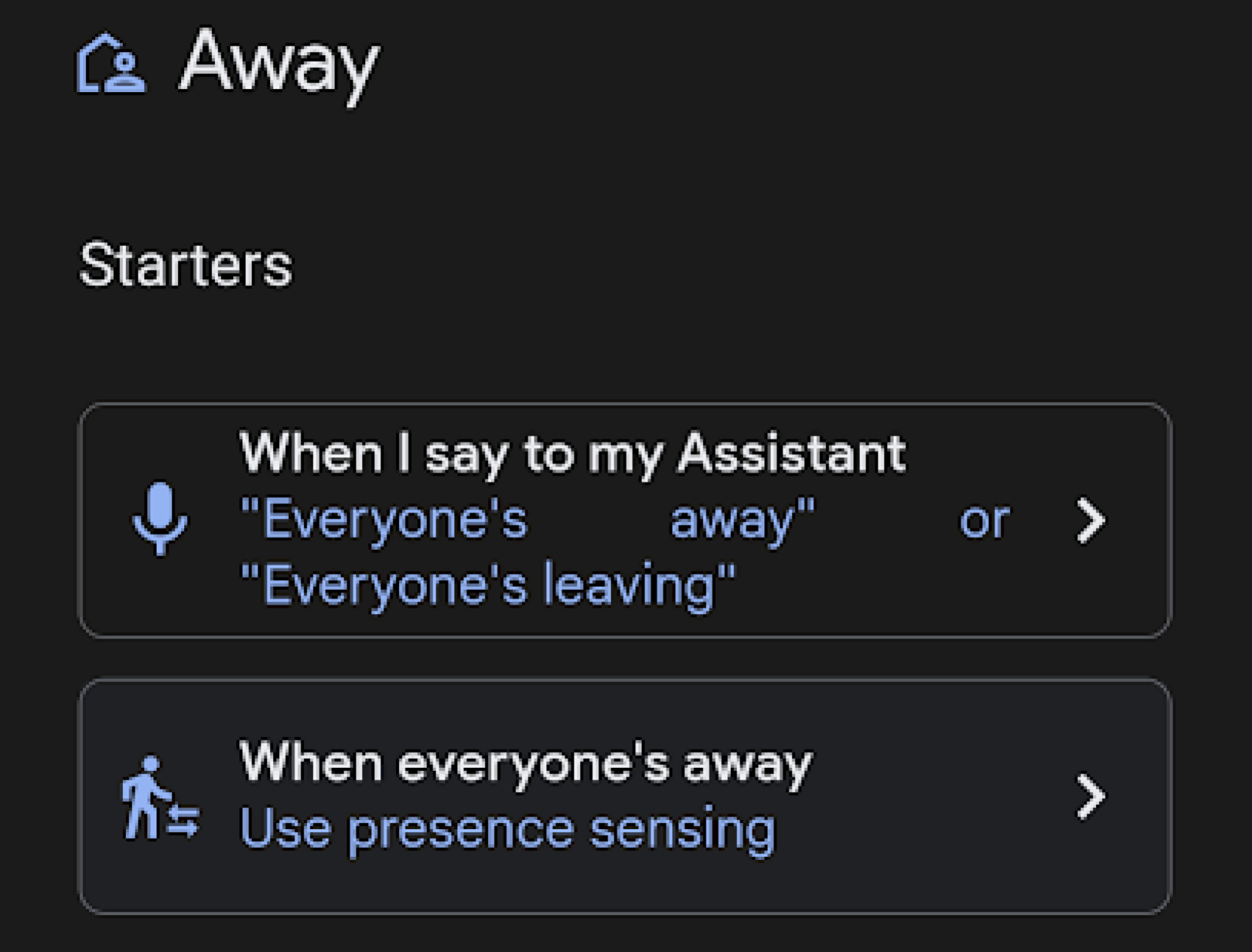
In the Google Home app, there's an "Away" routine in the Automations tab that lets me select which devices to turn off when the system detects that my phone is gone and away. But what if everyone else is home? I don't want the lights to turn off on them. Instead, I use an automation that turns the lights off when two conditions are met: I'm not at home, and none of the house's centralized gadgets, like the Chromecast-connected TVs, are on.
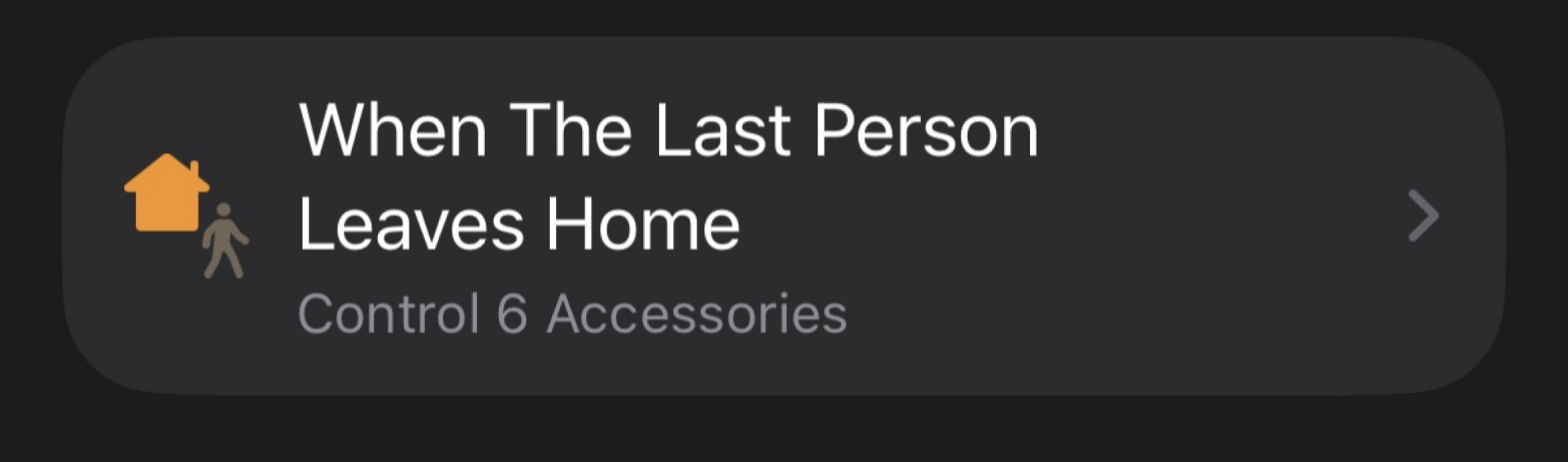
Even if you aren't in the Google ecosystem, you can use similar "if-this-then-that" logic. For Apple HomeKit users, the Shortcuts app is a better way to make a "Leave Home" automation and add a "Get State of Home" condition to ensure companion devices, like an Apple TV, are not in use. Amazon Alexa users have it a bit harder, as there is no native way to detect a device's on/off status. You can create a location-based routine or use the "Away Lighting" feature (in your Home/Away settings). It effectively switches on an "enforce" mode when you leave.

Set the morning volume
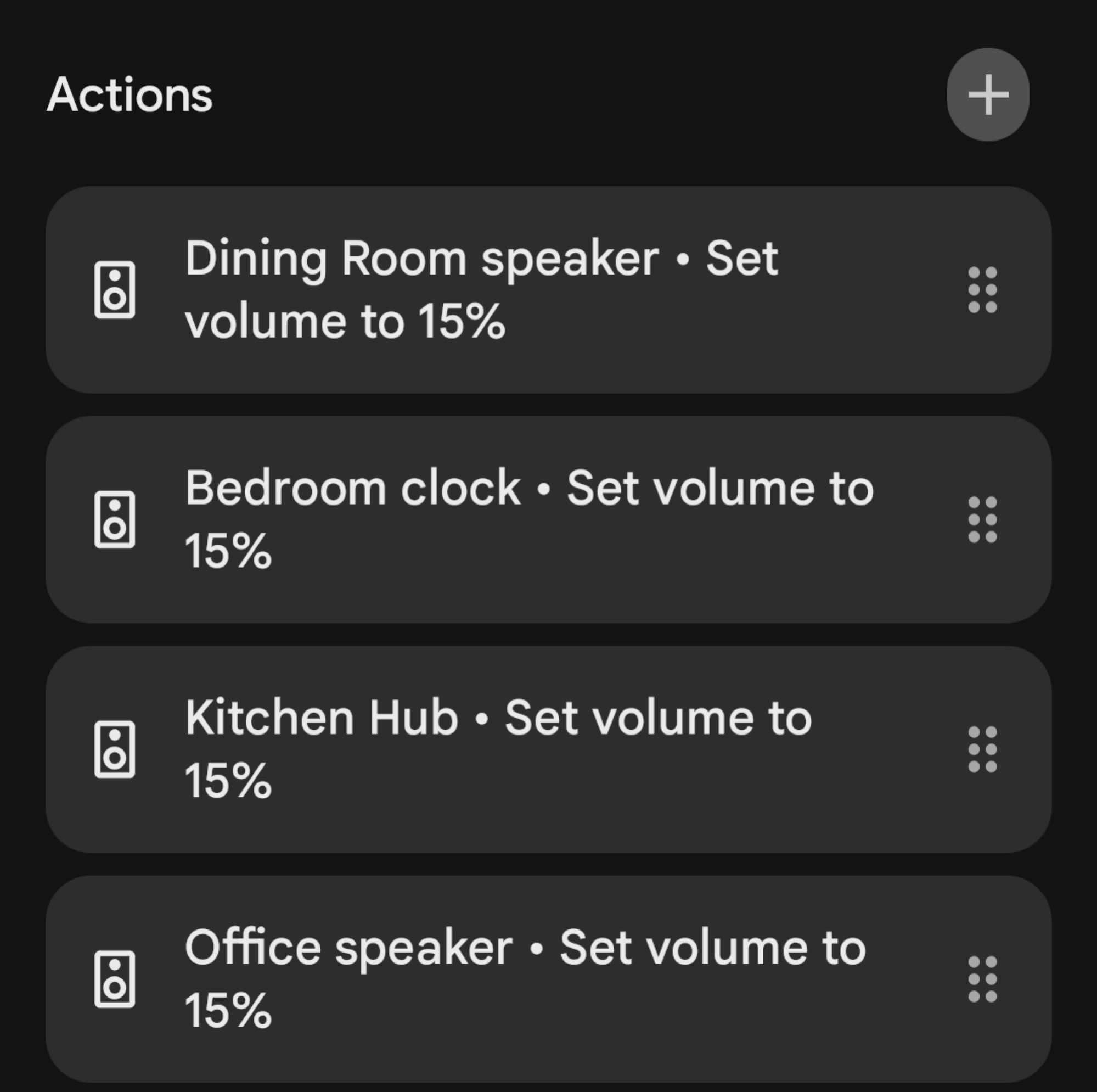
Some people like to rock out first thing in the morning. But there's nothing worse than scaring the rest of the household into a wake-state because the volume was left on high. While you could yell over the device streaming music or run to turn down the volume, there's no need to deal with all that. Instead, set a volume-first routine so the speaker is set to the desired volume each morning before anyone activates it.

In the Google Home app, under Automations, set the formula to run first thing in the morning every day, week after week. Then select the offending speaker-equipped devices. (I set up all my smart speakers at the same volume each day, upstairs and downstairs, since you never know.) Apple and Alexa have similar setups. In the Apple Home app, you'll set a scene on the corresponding HomePod to run at a Time-of-Day Automation. And through Amazon Alexa, you'll create a Routine with a "schedule" trigger, then select Echo devices to set the volume.
Deter people from your porch
If you're not interested in visitors at certain times of day or night, you can set up your porch to perform a visible action that gets whoever is outside to scram.
If you have a doorbell camera, you are likely used to getting passive notifications that someone is visible. You can turn that notice into a smart home automation. Set it up so that when motion is detected, the outdoor lights blast to full brightness and the outward-facing lights inside the house flicker on. You will need smart bulbs or smart plugs to enable this.

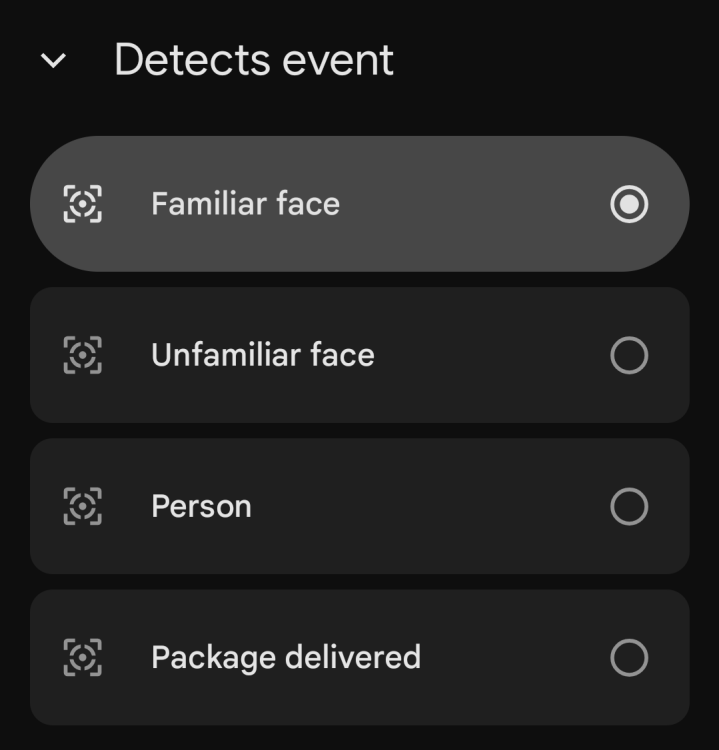
In the Google Home app, the Automations tab is where this is done. I set my Nest doorbell camera to "Starter" when it detects "Person seen." Then, I choose the lights that I want blaring at 100% under Actions. Apple smart homes need HomeKit Secure Video (HSV)-enabled cameras to access something like this. In the Home app, you can create an automation that runs when the camera detects activity, then select the outdoor lights and the outward-facing lights that should turn on. Amazon users with Ring cameras can do the same in the Alexa app under Routines. You can even go a step further and enable the same "Away Lighting" feature from the last tip, which broadcasts a chime inside the house the moment motion is detected.
Focus mode for the house
Unfortunately, I can't focus. I need all external distractions disabled in some capacity. Rather than do that manually, I set up an automation to get the rest of the house whipped into shape when it's time to work. With that, I skip saying a command out loud and instead set it up on a schedule.
Beginning at 9:30 each morning, except weekends, I put the action to adjust all the lights in my office to a specific setting, enough to get me into the groove, and turn off any other lights in the house that may have been left on from the chaotic morning routine. I also turn off the TVs and any internal-facing security cameras that shouldn't be watching me while I work. It's a similar schematic for Apple HomeKit users, though it's even better because iOS lets your iPhone's state set the tone. In the Shortcuts app, you can create a personal automation. Select a Focus mode as the trigger (it might look like "Do not disturb"), then select "When Turning On." You'll then set the action to "Control Home," and that's where you'll put the status for smart lights and any other devices you want. Once you place the iPhone into silent mode, or the clock strikes 9:30 a.m.—whichever comes first—you'll see the devices linked here follow suit.
Alexa uses a similar logic to Google Home, with the schedule doing the heavy lifting. In the Alexa app, go to Routines and create one with a scheduled time as the trigger, set to run only on weekdays. Then add the smart home actions you want to adjust, turn off, and turn on. The only bummer here is that there is no way to extend the action to your smartphone, at least through Alexa.
Create a Guest Mode for smart devices
People are confused about how I control my house, and I don't blame them. So, I set up a "limited access" guest profile for friends who plan to stay only a night or two.

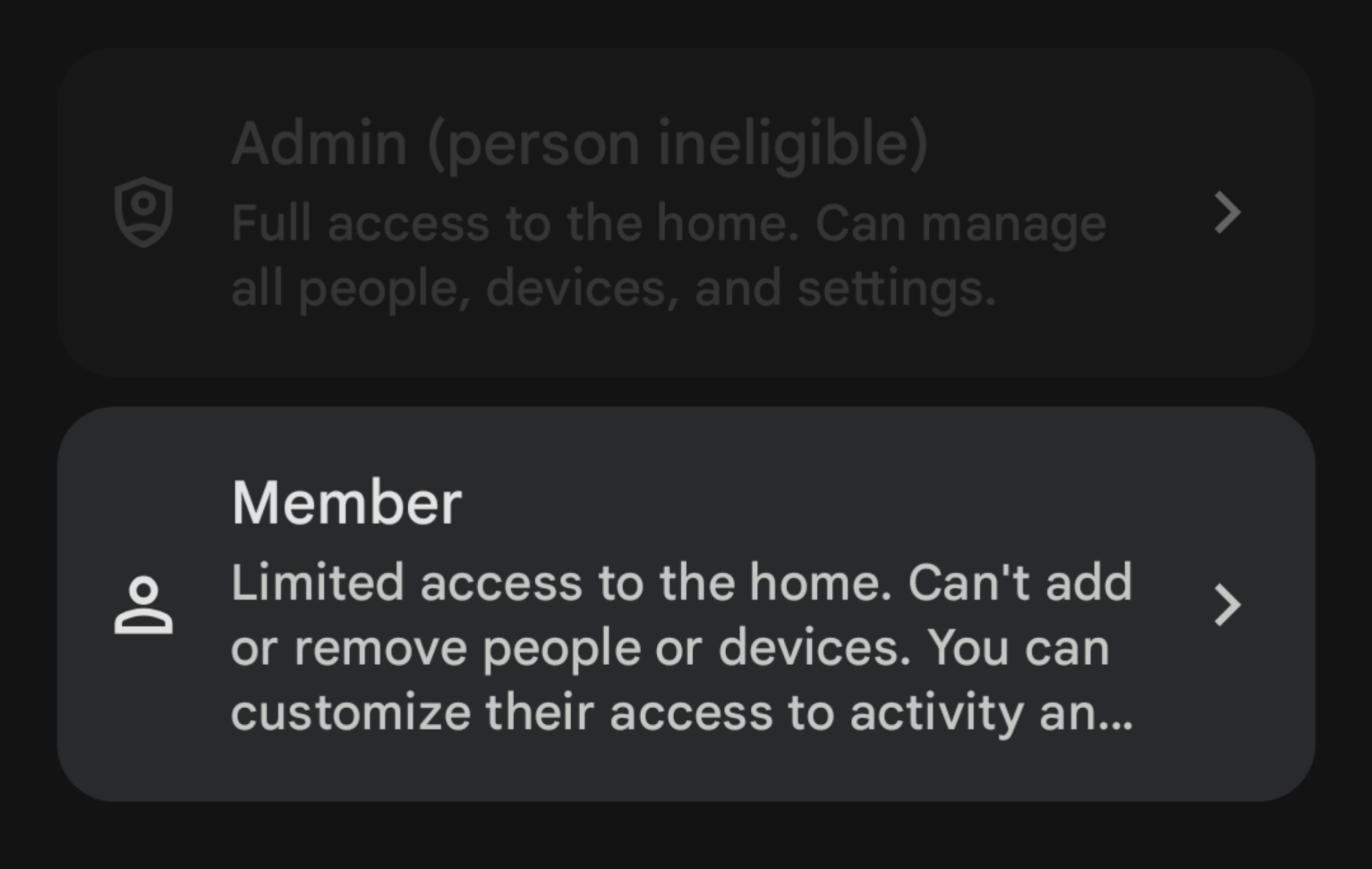
Google Home lets you invite people with the "Member" role to access smart home controls. Provided they have a Google account, the person can access connected lights in the designated rooms as needed. Apple HomeKit is much more granular, but it works similarly. You can invite people by their Apple ID and manage access to certain accessories. You can also lock them out of security cameras and thermostats, so they have access only to the essentials, like the smart lights.
In the Amazon ecosystem, Alexa is the most limited. (It once offered a now-deprecated Guest Connect feature.) Instead, you'll rely on the Amazon Household feature, so you'll have to invite a guest with an Amazon account to control devices. However, this also gives them access to the whole kit and caboodle, like your payment methods. If you want to avoid oversharing, teach your guests the basic "on" and "off" commands for your smart devices.
Protect your thermostat
If you don't want other people adjusting your thermostat, you can lock them out with your smart home. In Google-led smart homes, you can set up a PIN in the Home app to prevent manual adjusters from accessing the thermostat and changing the temperature. However, this works only with compatible hardware, like a Nest Thermostat.
In an Amazon home, you need an Alexa-compatible thermostat. You could dig through the settings of the manufacturer's apps to set up a PIN to keep people from messing with the dial. Or you can use a Routine within Alexa to set a specific schedule so that the temperature automatically returns to your preferred setting even if someone else has touched it.

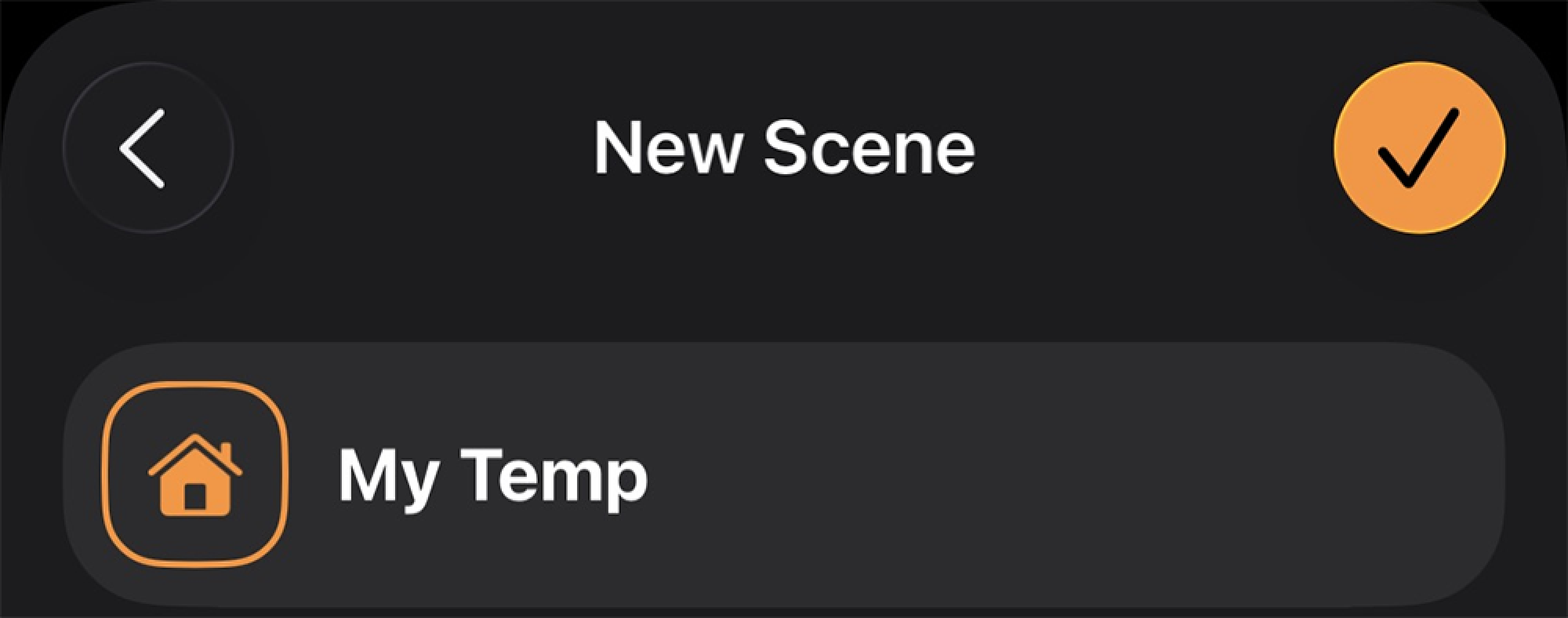
Apple HomeKit lets you, the smart home owner, be the boss with Scenes. (Get used to making them, because they become essential later.) In the Home app, create a scene called "My temp" and then set the compatible thermostat to your preferred temperature. In the Shortcuts app, create a personal automation to run this scene at a specific time, then select how often you want it to run. This will check and adjust the temperature every few hours to ensure it's at your favorite level, not anyone else's.
Never forget another load of laundry
I have a connected washer and dryer for laundry, which I can configure to alert me when a load is done. There's the simple push notification, which might work for some, but I prefer Google Home to holler at me when the laundry's done drying. In the Home app, under Automations, I can select my LG dryer going off as the status, then ask the Home app to broadcast a message to a few specific smart speakers around the house to let me know the laundry is ready to fetch.
If you don't have internet-connected appliances, you can use a smart plug with energy- and power-monitoring capabilities from brands like Govee or TP-Link's Kasa. Provided they can handle high-voltage use (look for over 15 amps), you can plug in your unconnected washer or dryer that way and have it notify you when the appliance shuts off.
Apple HomeKit users should look into compatible Eve Energy smart plugs, then create a personal automation routine in the Shortcuts app to trigger when the smart plug's current drops below a set threshold. The action can be to "Control Home," and then choose a scene that flashes lights a certain color at high brightness, all-lights-on, as an indicator that it's time to get to the clothes. Amazon users are in the same boat. A compatible smart plug can be added to a Routine that triggers when the smart plug's energy usage is below a certain wattage. For the action, you'd set a smart bulb to red or something similar to serve as a visual cue that it's time to fold.
Don't water when it rains
My husband has set up a vast network of internet-connected sprinklers in both the front and back yards using B-Hyve. It's great for easily turning the sprinklers on and off, and for scheduling them in the summertime. But in the winter, we don't need to water the grass as much as we do in the dry summer. So we set up a weather override in the app. If you don't have a smart sprinkler setup, you can fake it. Again, all you need is a smart plug rated for outdoor use, plugged into the sprinkler system. An external temperature sensor can make this routine more accurate.
For Google Home users, you'll rely on seasonal schedules instead of live weather data. Start a new automation with a "time of day" trigger that runs only on weekdays. You will need to manually turn this routine off in winter to prevent it from overwatering the lawn. You can use a third-party service like IFTTT or Zapier to set up something that's based on the actual weather forecast. Alexa requires a similar third-party to make a Routine with a weather condition.
Apple is more accommodating. In the Apple Home app, you can create a time-of-day automation and then convert it to a Shortcut to add the weather as a condition. You can then set the action to "Get Weather Forecast" and select whether the current weather is "rainy" or whether the chance exceeds a certain percentage. If the forecast calls for rain, the Shortcut doesn't affect the system. Alternatively, if there is no rain, the Shortcut continues and sets the sprinkler's smart plug to "on."
Play music or soundscapes on command
I work best with one of those binaural tracks on loop in the background. Instead of manually starting these tracks every day, I can have Google do it by tying my soundscapes directly to a routine. You can make one, too, for any media you'd like to listen to.
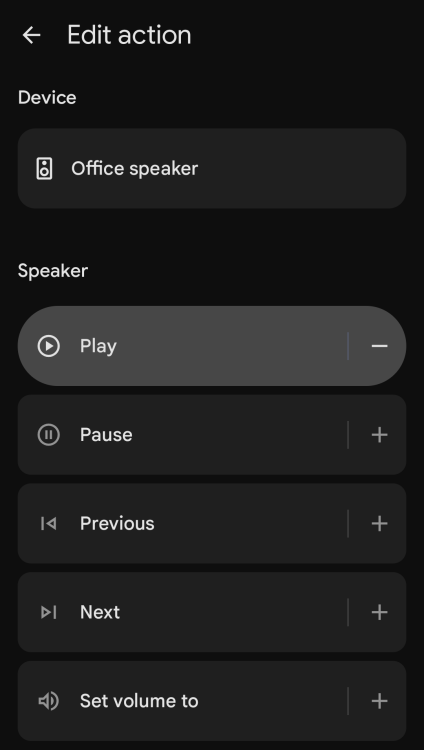
In the Google Home app, under Automations, create a household routine that runs when you say "Hey Google, it's chill time!" Under Actions, select which lights should turn on and how they should be set up. Then, you can choose a smart speaker or a Chromecast device and set it up to play specific media from Spotify or YouTube.

The same goes for Apple and Amazon households. Apple Home lets you set a time-of-day automation or a voice command to run on its own. For audio, select the HomePod and set it to play "ambient sounds" or anything from Apple Music. HomePod supports a "Stop Playing After" setting, so you can set it to turn off after an hour or two.
Amazon also relies on a Routine. For the action, select the music and audio option, then specify the source of your noises. Add a second action by selecting "Timers & Alarms" and setting a "Sleep Timer." This ensures that Alexa stops the audio after a set time, like with Apple Home, so you don't have to turn it off manually.
Get an alert if someone leaves the garage door open
The best part of having a smart home is remote access to all the appliances and devices you're worried about leaving on or open when you leave the house. You can do this with your garage without dealing with one of those tricky garage door sensor installations, provided you have a compatible smart home hub.
You can buy a cheap security camera that uses an SD card to monitor the garage door and let you peek in. Or, for around $20, you can buy a small ZigBee-enabled tilt sensor and automate it to check the garage status once the system has detected that everyone is out of the house. In Google Home, you'd attach this sensor to the "Home & Away status." Like the routine we set up for the lights earlier, here you'd choose the tilt sensor to check when "Everyone is Away." If the sensor device status is set to "open," you can select an action to notify you with a custom message. Closing it is still on you, though. If you were the last to leave, you'll need to double back; if someone else was, you can quickly call or text them to turn around and close the door.
Apple and Amazon have the same location-based blueprint. On Apple, you'd set up the sensor along with the "People Leave" automation, then set the condition to "Open" after the last person leaves. Set the Action to send a notification to your device if so. And on Amazon, set a Routine to check for the garage status when you've left the premises.

#710 Instagram Reels May Be Coming to Your TV
As I write this, I'm coming off a lunch break that lasted a little too long because I couldn't stop watching YouTube Shorts on my TV. And if Instagram Reels are your own vertical video poison—and you own an Amazon Fire TV device—you can now do the same. Starting today, you can download the new Instagram for TV app to watch Reels on your big screen via a dedicated interface that should be way more natural than simply casting the mobile app from your phone.
Currently exclusive to Amazon devices, the Instagram for TV app supports up to five accounts and comes with full functionality for searching for Reels and profiles, as well as liking Reels and browsing comments or reactions (although text posts and photo posts are not included). Unlike on the standard mobile feed, Amazon says "Reels are organized into channels tuned to your interests," which you can see from a horizontal home screen.
These channels are somewhat similar to the YouTube Shorts interface that's baked into the standard YouTube TV app, showing you a small selection of shorts you can choose from based on a thumbnail. Examples include "For you" and "Popular with Friends," but you're also still able to swipe past any Reel to your heart's content, and let the algorithm take you for a ride. A post from Meta also says channels could include Reels tailored to a specific topics that match your interests, like "sports highlights" or "hidden travel gems," although the company hasn't provided any screenshots or videos showing this off quite yet.
According to Meta, the new app is currently "an early test." It's starting with U.S.-based Amazon devices, and the company says it will "expand to more devices and countries" as it learns more (Amazon also says it's the "first" company to get the app, implying others will get their own versions in the future).
What devices support Instagram for TV?
Currently, the Instagram for TV app is available in the Amazon Appstore for what Amazon tells me is a broad range of Fire TV devices, including partner devices like the Panasonic W70B LED 4K TV. While a full list is not available at the moment, the company's blog post announcing the app mentions support for the following devices in particular:
Fire TV Stick HD
Fire TV Stick 4K Plus
Fire TV Stick 4K Max (1st and 2nd Gen)
Fire TV 2-Series
Fire TV 4-Series
Fire TV Omni QLED Series
In addition to adding channels to the Reels experience, Meta says that future updates may also add ways to use your phone as a remote, share feeds with friends, and explore "a more intuitive way to channel surf."
Instagram for TV leaves TikTok as the last major short form video platform without a dedicated TV app, although The Information reported earlier this Summer that TikTok is looking to catch up soon.
How to watch Instagram Reels on any smart TV or streaming device
While official Instagram for TV support is currently limited to Amazon devices, that doesn't mean you're out of luck if you don't have a Fire TV stick or display. To watch Instagram Reels on your TV without using the Instagram for TV app, open Instagram Reels on your phone and start browsing. Next, pull up your phone's quick settings menu by swiping down from the top-right corner.
On iOS, search for the screen mirroring button (which looks like two overlapping screens), and on Android, search for a button that says something like "Cast" (it will vary depending on your device). Tap it to see any compatible wireless screen mirroring devices nearby, which will let you view the mobile Instagram app on a TV screen, and even send audio over with it. It's not foolproof—my LG OLED TV works with iOS Screen Mirroring but not Pixel casting—but it's worth a shot.
Update 12/16/2025: Updated with comment from Amazon confirming that the Instagram for TV app is available for additional devices beyond those mentioned in the company's announcement post.

#702 प्रोग्राम - उत्तराखंड पेन, कॉपी, पेंसिल, बॉक्स , कटर, रबर, और अन्य शिक्षण सामग्री डोनेशन






Comments
8 comments